
Knowledge Buckets
Knowledge Buckets
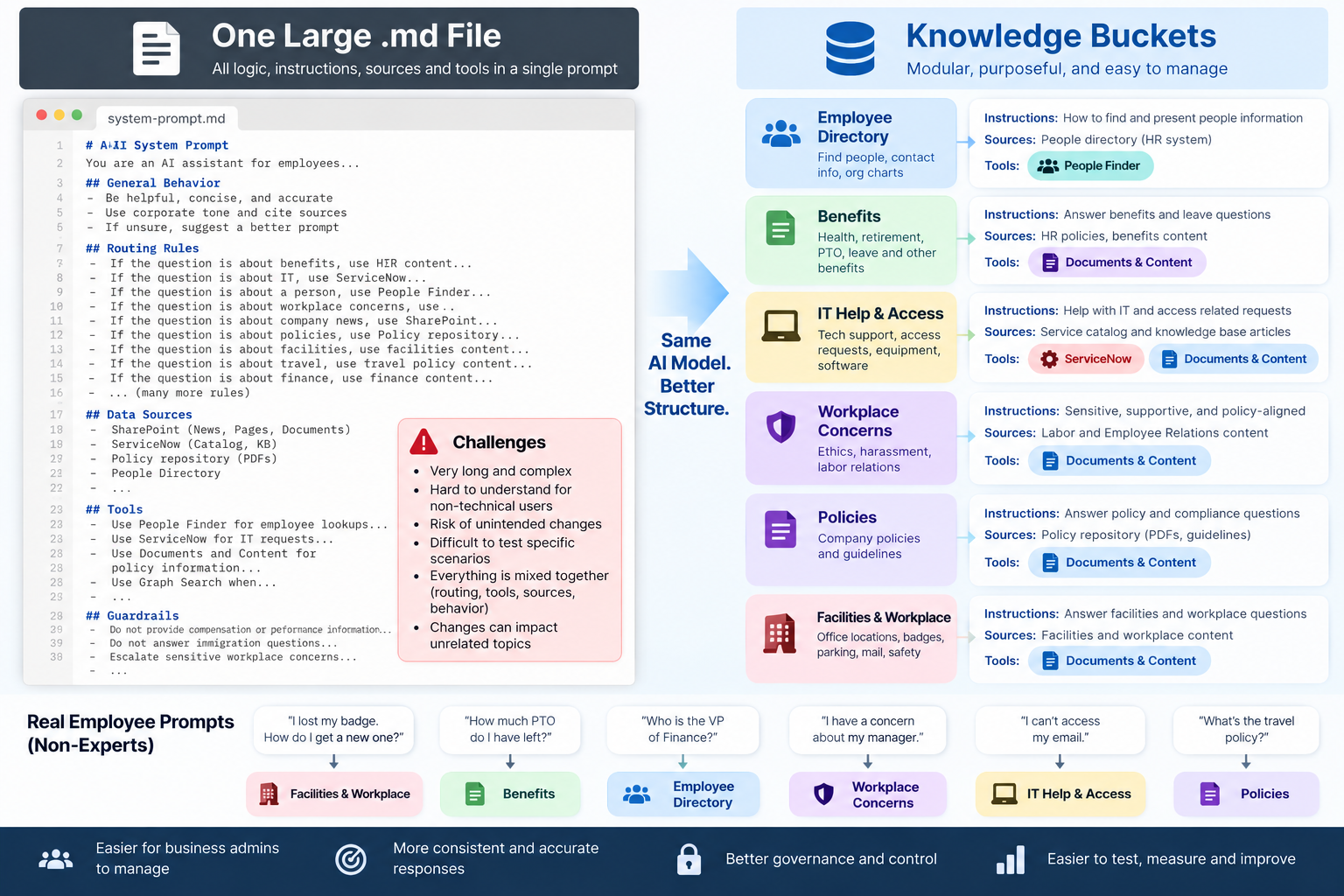
Knowledge Buckets give organizations greater control over how AI responds to specific employee questions and use cases.
Instead of searching across all available information, Knowledge Buckets allow you to define the knowledge and behavior AI should use for a particular scenario.
Knowledge Buckets provide a business-friendly implementation of a pattern the AI industry is increasingly adopting: rather than putting everything into one enormous prompt, instructions, knowledge, tools, and capabilities are organized around specific purposes.
This makes AI behavior easier to manage, govern, test, and improve—without requiring business administrators to manage complex system prompts.
Key Capabilities
- Curated Knowledge – Define the documents and information AI should use.
- Custom Instructions – Control how AI should respond for a specific use case.
- Intent-Based Routing – Automatically route employee questions to the appropriate Knowledge Bucket.
- Response Control – Define how answers should be structured and presented.
- Agent Integration – Connect Knowledge Buckets to AI agents when additional capabilities or actions are needed.
Knowledge Buckets help make AI responses more relevant, predictable, and aligned with the needs of the organization.
AI Routing & Knowledge Bucket Best Practices
Practical guidance for building deterministic, reliable, and user-friendly AI experiences.
Purpose
Knowledge Buckets (KBs) should make AI behavior more deterministic, predictable, and aligned with business expectations.
The problem they solve is not simply knowledge organization. The bigger problem is intent and routing.
Employees will rarely provide detailed prompts. They will ask things like:
- "Tell me about leave."
- "What is our PTO policy?"
- "How do I get a new badge?"
- "How much PTO do I have left?"
The AI experience needs to determine which agent, tool, system, or content source should handle the request without requiring employees to learn how to write better prompts.
The goal is not to make users better at prompting. The goal is to make the platform better at understanding them.
1. Start With the Use Case — Not the Knowledge Bucket
Do not begin an implementation by defining Knowledge Buckets. First define the questions employees are expected to ask and the expected behavior for those questions.
For each representative question, determine the expected source, tool, system, and response behavior.
Examples:
- What is the policy on N95 fit testing? — Use Documents & Content and summarize the current effective policy with citations.
- How do I request a replacement badge? — Use ServiceNow knowledge and intranet content.
- How much PTO do I have left? — Use the HR or Workday agent to retrieve the employee's personal PTO balance.
- What is our PTO policy? — Use Documents & Content to explain the policy with citations.
- Tell me about leave. — Resolve the intended HR meaning and route to approved leave-related sources.
Prompt → Intent → Expected Routing → Expected Response
2. Knowledge Buckets Should Be Use-Case Based
Avoid designing Knowledge Buckets around individual systems.
Names such as ServiceNow, SharePoint, Workday, or Documents describe where information lives, not what employees are trying to accomplish.
Prefer use-case-oriented names such as:
- Time Off & Leave
- Benefits & Healthcare
- Workplace Access
- IT Help & Support
- Travel & Expenses
- Policies & Compliance
- New Hire Onboarding
- Workplace Safety
A single Knowledge Bucket may use multiple underlying systems.
For example, Workplace Access could include ServiceNow knowledge, a badge request workflow, security policies, office access documentation, and facilities content.
The employee should not need to know which system owns the information.
3. Knowledge Bucket Descriptions Are Only Used for Auto Resolution
The Knowledge Bucket Description has one purpose: Auto Resolution.
When Auto Resolution is enabled, AI uses the Knowledge Bucket's name and description to determine whether an employee's request belongs to that Knowledge Bucket.
The description is not:
- An AI instruction
- Used to tell AI how to answer
- Used to influence document retrieval or ranking
- Added as knowledge or context
- Used after the Knowledge Bucket has been selected
Once the Knowledge Bucket has been resolved, the description has completed its job.
Think of the description as a routing description, not an AI instruction.
Writing Good Knowledge Bucket Descriptions
A good description explains when an employee's request should be routed to the Knowledge Bucket.
Include common topics, terminology, and employee intents that belong to the use case.
Time Off & Leave
Employee questions about PTO, vacation, sick time, holidays, leave of absence, parental leave, FMLA, time-off policies, and requesting or managing leave.
IT Help & Support
Employee requests for technical support, including computer problems, software issues, passwords, account access, connectivity, applications, devices, and other IT assistance.
Benefits & Healthcare
Employee questions about health insurance, dental and vision coverage, benefits enrollment, life insurance, healthcare plans, dependents, and employee benefit programs.
Workplace Access
Employee questions and requests related to badges, building access, office access, lost or replacement badges, physical security access, and workplace entry.
Travel & Expenses
Employee questions about business travel, travel policies, booking flights or hotels, expense reports, reimbursements, corporate cards, and travel-related expenses.
What to Avoid
Do not use the description to provide instructions such as:
Search SharePoint and ServiceNow and provide a concise response with citations.
That describes what AI should do after routing, not when the Knowledge Bucket should be selected.
Instead:
Employee questions about IT support, technical issues, service requests, account access, devices, and workplace technology.
Put response behavior, instructions, and source configuration in the appropriate Knowledge Bucket settings — not in the description.
4. Knowledge Buckets Make AI More Deterministic
Without a Knowledge Bucket, the AI may receive a prompt such as:
"What is our PTO policy?"
The LLM evaluates the available tools and agents and chooses what appears to be the best option. Multiple agents may contain similar terms such as PTO, employee, benefits, leave, or vacation.
Without a Knowledge Bucket:
User Prompt → LLM Interprets Intent → LLM Chooses From Available Agents/Tools → Best Available Guess
With a Knowledge Bucket:
User Prompt → Auto Resolution → Knowledge Bucket → Approved Agents, Tools, and Sources → AI Chooses Within a Controlled Scope
A Knowledge Bucket therefore acts as an intent and routing control layer, not merely a collection of documents.
5. Knowledge Buckets Compensate for Short and Ambiguous Prompts
Real employee prompts frequently lack context.
Consider:
"Tell me about leave."
"Leave" could mean paid time off, leave of absence, parental leave, medical leave, military leave, leaving the company, or something unrelated to HR.
We should not solve this by requiring the employee to provide a more detailed prompt.
Instead, Knowledge Bucket descriptions should contain enough business context for Auto Resolution to recognize that terms such as leave, PTO, vacation, parental leave, FMLA, and time off belong to a known use case.
The Knowledge Bucket and its Auto Resolution description provide routing context the employee did not provide.
6. Routing and Knowledge Are Different Problems
It is important to distinguish between:
- Knowledge Retrieval — What information should AI use?
- Agent/Tool Routing — What capability should handle the request?
For example:
"What is our PTO policy?"
This should typically route to Documents & Content and return a policy answer with citations.
"How much PTO do I have left?"
This should route to an HR or Workday agent and retrieve the employee's personal PTO balance.
The words are similar, but the intent is different.
One is a knowledge question. The other is a transactional or personal-data question.
7. Do Not Assume Every Scenario Needs a Knowledge Bucket
Knowledge Buckets should not be created simply because the capability exists.
Start with the baseline AI experience:
- Provide the available agents and tools.
- Create good agent and tool descriptions.
- Provide appropriate system instructions.
- Test representative employee prompts.
Start Broad → Test → Observe → Tune → Introduce Knowledge Buckets Where Needed
If AI consistently routes correctly, additional routing controls may not be necessary.
If routing becomes inconsistent, ambiguous, or incorrect, introduce a Knowledge Bucket to make the behavior more deterministic.
8. Test With Realistic Prompts, Not Perfect Prompts
Testing should reflect how employees actually communicate.
Test prompts such as:
- "PTO"
- "vacation policy"
- "how much vacation do I get"
- "tell me about leave"
- "can I carry vacation over"
- "how many days do I have"
These are the prompts that expose routing problems.
A system that only works with carefully constructed prompts is pushing the intelligence requirement onto the employee.
9. Agent Patterns Must Support Multiple Use Cases
Different use cases may require different orchestration patterns.
Single Agent
A specific agent is selected by the experience, user, or application.
Example: "Check my PTO balance" routes directly to the HR Agent.
Routed Multi-Agent
The AI determines which specialized agent should handle the request.
Example: "Why can't I access Salesforce?" routes to the IT Support Agent.
Parallel Multi-Agent
Multiple agents independently respond to the same request.
This is useful when a customer explicitly wants all selected agents to provide their own response.
Collaborative Multi-Agent
Multiple agents work together, share context, and produce a single outcome.
For example, onboarding a new employee may require HR, IT, Facilities, and Identity agents to coordinate activities.
These should be treated as supported orchestration patterns, not competing architectures where only one can exist.
10. Document Expected Behavior Before Tuning AI
For important use cases, document the expected:
- Prompt
- Intent
- Agent or tool
- Source
- Response behavior
For example:
"What is the policy on N95 fit testing?"
- Intent: Safety Policy
- Tool: Documents & Content
- Source: Current effective safety policies
- Response: Summary with citations
"How much PTO do I have left?"
- Intent: Personal PTO
- Tool: HR Agent
- Response: Personalized PTO balance
This becomes both an implementation specification and an AI test plan.
11. Knowledge Buckets Can Control Content Within the Same Tool
Knowledge Buckets are also valuable when multiple intents use the same Documents & Content tool.
The question is no longer simply:
"Can AI search our content?"
It becomes:
"For this intent, which content should AI use?"
For example, a Time Off & Leave bucket may include:
- PTO Policy
- Leave of Absence Policy
- Parental Leave Policy
- Holiday Calendar
A Workplace Safety bucket may include:
- N95 Fit Testing Policy
- PPE Standards
- Safety Procedures
- Incident Reporting
The underlying tool can remain the same while the knowledge scope changes according to intent.
12. Recommended Implementation Methodology
- Collect representative employee prompts.
- Define the expected answer and behavior.
- Identify the expected agent, tool, or system for each prompt.
- Run the prompts against the baseline AI experience without Knowledge Buckets.
- Identify inconsistent or incorrect routing.
- Improve agent and tool descriptions first.
- Introduce use-case-based Knowledge Buckets where additional determinism is required.
- Write the Knowledge Bucket description specifically for Auto Resolution.
- Define which agents, tools, documents, instructions, and sources belong to each bucket.
- Retest ambiguous and minimal prompts.
- Continue tuning using real employee queries and feedback.
Core Principle
Knowledge Buckets are not folders for AI. They are a business-controlled intent layer.
They allow the organization to say:
"When an employee means this, these are the capabilities and information AI should use."
The Knowledge Bucket description helps Auto Resolution determine what the employee means. Once that routing decision is made, the configured knowledge, instructions, tools, and agents determine what happens next.
Without that control layer, the LLM is often making routing decisions based primarily on the employee's prompt and the descriptions of the available tools.
Sometimes it will make exactly the right decision. The problem is that you cannot always know when it won't.
That is where Knowledge Buckets provide their greatest value: more predictable routing without requiring employees to become better prompt engineers.